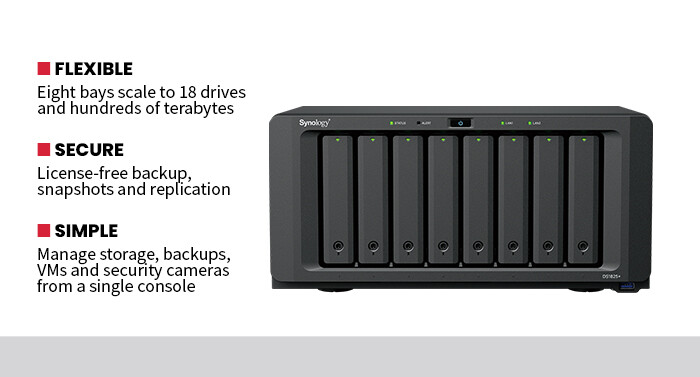
Two built-in 2.5-gigabit ports, with link aggregation and SMB multichannel, eliminated the bottleneck that throttled my old storage server; a PCIe expansion slot allows me to scale to 10- or 25-gigabit networking later, if needed.
Synology’s DiskStation Manager is intuitive and well-built. I configured storage, scheduled backups, spun up VMs, managed a handful of security cameras through Surveillance Station and enabled multifactor authentication and encryption, all from one browser tab. It looks and behaves like a real operating system, meaning even a nonspecialist administrator could manage the deployment successfully.
SPECIFICATIONS
PRODUCT TYPE: 8-bay desktop NAS
PROCESSOR: AMD Ryzen V1500B, quad-core, 2.2GHz, hardware encryption engine
MEMORY: 8GB DDR4 ECC SODIMM, expandable to 32GB
DRIVE BAYS: 8 x 3.5"/2.5" SATA HDD/SSD, hot-swappable, tool-less trays
FLASH CACHE: 2 x M.2 2280 NVMe SSD slots (caching or validated storage pools)
MAXIMUM RAW CAPACITY: Up to 360TB across 8 bays; up to 18 drives and 432TB, with two DX525 units and 24TB drives
RAID SUPPORT: 0, 1, 5, 6, 10, JBOD, Basic and Synology Hybrid RAID
OS: Synology DiskStation Manager (DSM)
EXPLORE: Why is continuous threat exposure management right for your organization?
Three Storage Challenges Every Growing Business Eventually Faces
Most growing businesses do not think much about storage until something goes wrong. Whether it’s soaring cloud costs, ransomware or employees waiting on large files to transfer, data management problems tend to appear gradually before suddenly becoming urgent.
Here are three storage challenges small and midsize organizations face most often and how a system like the Synology DS1825+ can help address them.
1. Runaway Data Growth and Cloud Bills
Many growing businesses generate more data every quarter than they once did over an entire year. Richer media, longer retention requirements and new AI tools all contribute to that growth.
A network-attached storage device like the DS1825+ gives organizations a way to regain control and grow their storage footprint without relying exclusively on recurring cloud costs. Files remain on the local network where they are fast to reach, while built-in tools can still sync copies to the cloud when offsite redundancy is required. The result is room to grow without a monthly bill that grows just as quickly.
2. Ransomware and the Backup Gap
Many small businesses believe they are protected because files are copied somewhere, only to discover during an incident that the backup was incomplete, out of date or encrypted right along with the originals. Ransomware in particular preys on that gap, and downtime from a failed recovery can be existential for a smaller company.
The DS1825+ addresses the problem with layered, license-free protection. Active Backup for Business captures whole machines on a schedule, Hyper Backup ships an encrypted copy offsite to satisfy the 3-2-1 backup rule, and immutable snapshots create restore points that ransomware cannot alter.
In testing, restoring a deleted folder or an entire workstation took minutes, turning what could have been a worst-case scenario into a routine recovery task.
3. Performance Bottlenecks in Multiuser Workflows
Performance problems often emerge when multiple employees access large files simultaneously. Creative teams, engineers and finance departments can quickly overwhelm storage systems originally designed for just a handful of users.
With dual 2.5-gigabit networking, link aggregation, optional NVMe caching and a clear path to 10- or 25-gigabit speeds, the DS1825+ keeps multiple users moving large files at once without the slowdowns that plagued older NAS devices.
For growing businesses, that performance headroom matters. Shared storage should help teams work faster, not become another bottleneck they have to work around.
SMBs almost certainly rely on shared storage and reliable backups to keep their operations moving and their auditors happy. The DS1825+ delivers, with depth of features that punch well above its modest footprint and price. It made my data faster to reach, far harder to lose and dramatically easier to manage.