




Nov 10 2026
Hardware

Review: Dell Pro 14 Plus PB14250 Balances AI Performance With Security

This new artificial intelligence–capable laptop is safe, manageable and powerful.

Every IT leader I talk with complains about being pulled in two directions at once. The business wants artificial intelligence on every employee workstation right now, but it also wants those same machines locked down from threats and easily manageable everywhere. 

Underlying both demands is an executive push to add AI capabilities without compromising cybersecurity or creating new headaches for IT. Lock everything down too tightly, and it can smother the performance and flexibility users were promised. Focus exclusively on new AI capabilities, and IT teams can be left managing devices that were never designed with enterprise security in mind. 

Click the banner below to unlock insights to modernize your workplace. 


Security Without Compromising Performance

The Dell Pro 14 Plus PB14250 is designed to satisfy both camps in a single 14-inch business laptop. After spending a month with it, I think it succeeds at helping IT managers get to the other side. 

The PB14250 is a business-class AI PC anchored by an Intel Core Ultra 7 processor with a dedicated neural processing unit (NPU) for AI acceleration and wrapped in Intel vPro Enterprise technology for fleet-level security and management. Dell aims this laptop squarely at mobile professionals, traveling executives and hybrid employees who need strong performance in the office and reliable, secure connectivity from the road. 

I took the Dell with me on a work trip from Charlotte, N.C., to Houston to Washington, D.C., and back. I also placed the Dell Pro 14 Plus into rotation with three users across my organization for a full week. Those testers included field-based staff and members of my IT team, who were as interested in the laptop’s remote management capabilities as they were in its day-to-day performance. 

I tracked the metrics that matter to a corporate buyer, including performance on real workloads, battery life under genuine travel conditions, video meeting quality and the usefulness of its enterprise management features. I also surveyed every user afterward. Feedback skewed strongly positive, with some of the most enthusiastic responses coming from a hard-to-impress crowd: my IT staff. 

RELATED: Find out how some businesses are handling device management with small IT teams.

A Powerful Laptop Travels Well

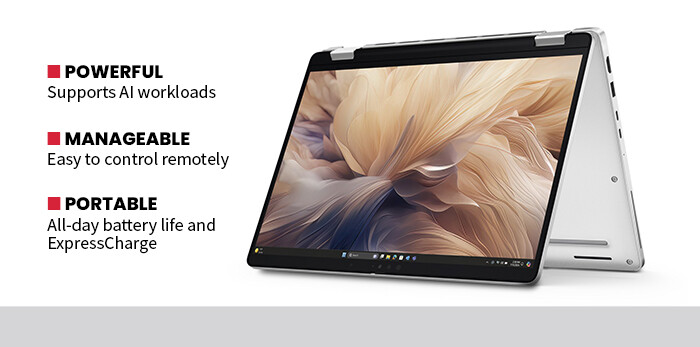
It is easy to focus on the AI branding, but what makes this machine interesting for businesses is how thoroughly it is designed for managed, mobile work. In everyday use, the 12-core Core Ultra 7 handled everything I threw at it, from sprawling spreadsheets and dozens of browser tabs to back-to-back video calls, all without noticeable slowdowns or distracting fan noise. 

The dedicated Intel AI Boost NPU provides up to 12 trillion operations per second of AI acceleration and can handle supported AI features without relying exclusively on the main processor. During my evaluation, AI-enhanced collaboration and productivity features ran smoothly alongside conventional office workloads, allowing the system to remain responsive even during busy workdays. 

Battery life was one of the most noticeable strengths. During my work trip, I comfortably made it through a full day of mixed use, including flights, meetings, productivity applications and video calls, on a single charge. Fast charging through the 65-watt USB-C adapter also made short stops at a gate or conference room useful for topping off the battery. The configuration I evaluated includes Wi-Fi 6E and 4G connectivity, giving remote employees multiple ways to stay connected. 

The enthusiasm from my IT testers also made sense. Intel vPro Enterprise adds hardware-assisted management capabilities that can help administrators diagnose, manage and recover properly configured systems remotely.  

Instead of treating AI performance, portability and enterprise security as separate priorities, the Dell Pro 14 Plus PB14250 succeeds because it combines these features in a compact business laptop that works for users and IT managers. For organizations trying to add practical AI capabilities without giving up control of their endpoint fleet, that balance makes the Dell Pro 14 Plus a strong choice. 
BTQ426_PS-Soto_Dell_secondary


SPECIFICATIONS

Product Type: 14-inch business AI laptop running Windows 11 Pro

Processor and AI: Intel Core Ultra 7 265U with vPro Enterprise; 12 cores, 14 threads and up to 5.3GHz; Intel AI Boost NPU rated at up to 12 TOPS

Memory and Storage: 32GB DDR5 memory; 512GB PCIe NVMe SSD

Display: 14-inch FHD+ 1920x1200 anti-glare IPS display, 300 nits

Connectivity: Wi-Fi 6E, Gigabit Ethernet and 4G WWAN; Thunderbolt 4, HDMI 2.1 and USB-A connectivity

Security: Intel vPro Enterprise, TPM 2.0, IR face recognition and camera privacy shutter

Three Priorities When Rolling Out AI PCs

Bringing AI capabilities to a mobile or hybrid workforce requires more than choosing devices with dedicated AI hardware. IT teams also need to consider how those systems will be secured, managed and supported once they leave the office. Keep these three priorities in mind: 

1. Demand security and manageability at the hardware level.

For businesses deploying laptops to employees scattered across offices, cities and home workspaces, the ability to secure and manage devices remotely is critical.

Intel vPro Enterprise is designed to address that challenge. When properly configured with supported management tools, its hardware-assisted capabilities can allow administrators to remotely diagnose systems, control power and perform recovery tasks even when the operating system is not functioning normally. 

Combined with technologies such as TPM 2.0, face recognition and a physical camera shutter, those capabilities give IT teams additional ways to protect and support laptops beyond traditional office environments. 

2. Rightsize the system for real AI workloads.

Not every employee needs a workstation-class AI system. For many knowledge workers, AI increasingly appears inside collaboration, productivity and operating system features rather than as massive locally hosted models.

The Dell Pro 14 Plus reflects that kind of workload. Its dedicated NPU accelerates supported AI tasks while leaving the processor available for conventional business applications. That makes it well suited to employees who need everyday AI capabilities alongside the spreadsheets, browsers, meetings and productivity applications that still make up most of the workday. 

3. Preserve mobility without compromise.

An AI PC intended for mobile workers still needs to survive away from a desk. During my travel testing, the Dell Pro 14 Plus handled a full workday of mixed use on a single charge, while its fast USB-C charging provided a convenient way to add runtime during short stops.

Wi-Fi 6E and available 4G connectivity also give mobile users options for staying connected away from corporate offices. 

A final consideration is consistency. Standardizing on a business-class platform can simplify deployment, management and support across a fleet. For organizations measuring rollout costs not only in hardware dollars but also in IT hours, that predictability can matter as much as any headline AI feature. 

Rolling AI PCs into a business fleet is ultimately a balancing act between new capabilities and the practical demands of security, mobility and long-term management. The Dell Pro 14 Plus PB14250 handles those competing priorities particularly well. 

Close

New Research from CDW Explores AI and Cybersecurity

Learn how AI is helping IT teams manage risk and improve resilience.