



Nov 04 2026
Digital Workspace

Review: Kingston FURY Beast DDR5 Gives Business PCs More Memory Muscle

A 64GB DDR5-6000 kit gives demanding workstations the capacity and bandwidth to handle heavy multitasking, content creation and local AI workloads.

The typical office worker today is set up with a computer that has a capable processor and fast storage held back by limited memory. The reason is that everyday workloads have ballooned. Spreadsheets carry hundreds of thousands of rows, browsers hold 40 tabs, and more employees are experimenting with local AI tools that can consume enormous amounts of memory. 

When a system runs short of RAM, it begins relying on much slower storage as virtual memory. Productivity can fall off a cliff, often while users blame the network or the application. 

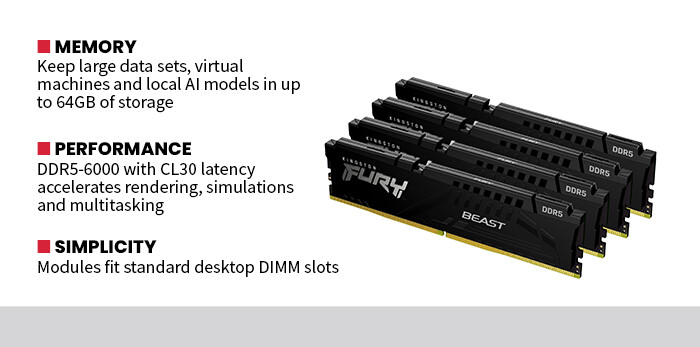
That was the problem I had in mind when I set out to test the Kingston FURY Beast DDR5, a 64 gigabyte kit of high-speed desktop memory, as a potential solution. Although the FURY line is marketed primarily for gaming systems, the same combination of capacity and bandwidth can benefit the workstations and power-user PCs that businesses increasingly depend on. 

The proposition is simple and appealing: Install two modules, enable one firmware setting and give a machine enough capacity and bandwidth to handle modern multitasking, content creation and local AI inference without constantly slowing down. 

Click the banner below to learn how to align your virtualization decisions with strategic objectives.


To put the memory through its paces, I upgraded eight workstations across my office over a full month, replacing aging or undersized memory with 64 gigabyte FURY Beast kits. These were real machines doing real work, including complex financial models, video and motion graphics projects, virtual machines, and locally hosted AI assistants. I benchmarked each system before and after the upgrade, then collected feedback from more than 30 people who regularly used those machines.  

On the technical side, I tracked the factors an IT buyer cares about: Did the memory reliably reach its rated speed? Did the upgraded systems remain stable under sustained loads? How much did real-world responsiveness improve? And how difficult would the upgrade be to deploy across a fleet? 

That last point matters a great deal. Memory upgrades have a reputation for becoming difficult, with kits that refuse to boot at their advertised speed or that demand an afternoon of firmware tinkering. The FURY Beast kits sidestepped that problem almost entirely. Each module dropped into a standard DIMM slot, and every system detected a fast, stable baseline on the first boot. Reaching the rated DDR5-6000 speed required changing a single setting in the system firmware. 

Across all eight machines, every installation started successfully the first time and remained stable throughout the monthlong evaluation. For a small IT team rolling out upgrades between support tickets, that reliability can mean the difference between a quick improvement and a lost day. 

LEARN MORE: How to counter the most common cybersecurity threats.

More Memory Muscle for Demanding Workloads

As my business leaned further into data-heavy and AI-assisted work, the demands placed on employees’ computers had quietly outgrown the amount of memory included with many of them. The FURY Beast kit met that demand, not with a flashy gimmick but with the two things that mattered most: It provided enough capacity to stop systems from rationing memory and enough bandwidth to keep busy processors supplied with data. 

The results underscored the value of both improvements. On the workstations upgraded to 64GB, the difference was immediate and obvious. A finance contractor who routinely crashed a massive model could finally keep the entire file open alongside a dozen browser tabs. My video editor saw export times on a representative 4K project fall by roughly 25%. A developer could run a local AI model that had previously crashed because of insufficient memory, turning an unusable experiment into a practical daily tool. 
BTQ426_PS-Soto_Kingston_secondary

For businesses that depend on desktop computers for demanding work, memory can be one of the simplest upgrades with the quickest payoff. The Kingston FURY Beast DDR5 64GB kit delivered the capacity, speed and consistent stability needed to turn sluggish workstations into systems better equipped for modern business workloads. 

SPECIFICATIONS

Memory Type: DDR5 (PC5-48000) unbuffered DIMM, 288-pin 

Kit Capacity: 64GB (2 x 32GB) 

Rated Speed: Up to 6,000 MT/s 

CAS Latency: CL30 (timings 30-36-36) 

DDR5 Features: On-die error correction code and on-module power management integrated circuit 

Architecture: Dual 32-bit subchannels, dual-rank (2Rx8) 

Module Height: 34.9 mm with low-profile black aluminum heat spreader 

EXPLORE: Why is continuous threat exposure management right for your organization?

Why Gaming Memory Can Make Sense in a Business PC

The Kingston FURY Beast is built for gamers, but the qualities that make memory useful for high-performance video games can also benefit demanding business workloads. 

Many modern computer games are technically impressive and very demanding on systems. They move large amounts of data quickly and place sustained demands on a computer’s processor and memory. The same is true for video editing, complex financial models, virtual machines, engineering software and locally hosted AI tools. The applications are different, but they all benefit from ample capacity, high bandwidth and low latency. 

A matched gaming memory kit can also simplify an upgrade. Its modules are designed and tested to operate together at a specified speed and timing, avoiding some of the uncertainty that can come from mixing memory with different capacities or performance characteristics. 

That consistency showed up during my evaluation. I installed the Kingston FURY Beast kits in eight computers, and every system started successfully on the first attempt. The upgraded machines remained stable throughout a month of heavy use. 

The gaming label does not mean the memory is appropriate for every business system. IT teams should confirm that a computer’s processor and motherboard support DDR5, the selected capacity and the intended speed. Servers and specialized workstations may also require platform-certified or server-grade memory. 

But for many mainstream desktops and power-user PCs, gaming memory can be a practical way to support business applications that have outgrown the systems originally purchased to run them. In my testing, the label mattered less than the result: more memory headroom, stronger performance under load and fewer slowdowns during demanding work. 

Close

New Research from CDW Explores AI and Cybersecurity

Learn how AI is helping IT teams manage risk and improve resilience.