Jan 06 2026
Digital Workspace

How AI-infused Tools Are Driving Collaboration and Productivity

From global powerhouses to local nonprofits, organizations are taking advantage of the latest workplace suites.

When the commercial real estate giant JLL began a worldwide operational transformation, shifting from regional to global business lines and corporate functions about seven years ago, it quickly realized it needed to centralize its productivity and collaboration tools too.

Previously, different regions standardized on different cloud-based solutions: Some used Microsoft Teams and OneDrive, while others chose alternatives for communication, collaboration and file storage. As JLL unified operations around the world, Microsoft built better integration across its Microsoft 365 applications, says JLL Global CIO George Thomas.

“We were globalizing our operation and, of course, none of this is effective if we don’t have a product that can match up to our objectives,” he says. “And that’s where Microsoft came through.”

Today, JLL’s 112,000 employees worldwide can seamlessly collaborate using unified productivity and collaboration software. “You're able to save yourself meeting time when you can asynchronously collaborate on a document across different time zones,” Thomas says.

Click the banner below to explore the solutions you need to give everyone a seat at the table.


Modern collaboration suites like Microsoft 365 and Google Workspace play a crucial role in shaping today’s digital workplace, empowering employees to communicate seamlessly and boost productivity, says Adam Holtby, Omdia’s principal analyst for workplace transformation.

These platforms now function as a central workspace where employees can communicate, manage workflows and access work resources and data, he says. For example, Microsoft Teams has become a productivity hub, a place for employees to text chat, hold video meetings, and access, edit and share files.

“It’s the first place employees go in the morning, and the last place they check before logging off at the end of the workday,” Holtby says. “It has become integral to modern business operations.”

Microsoft and Google have also integrated AI assistants — Microsoft Copilot and Google Gemini — to help employees work faster and more efficiently, from writing emails to generating meeting transcripts, says Laurie McCabe, co-founder and partner of the SMB Group. “People realize they can do more with these collaboration suites than they’ve ever been able to do before,” she says. “You get a big uplift in value when the software is integrated.”


JLL Deploys Microsoft 365 Worldwide

JLL standardized on Microsoft 365 in 2020 when employees transitioned to remote and hybrid work during the pandemic. While the company already used Outlook for email companywide, it migrated everyone to Teams, SharePoint, OneDrive and Microsoft’s security tools, including Defender endpoint protection.

Today, JLL uses SharePoint to host 140,000 sites for document storage and collaboration. On the productivity side, the company operates more than 5,000 Power Apps and 10,500 Power Automate flows that streamline processes and automate tasks.

The unified Microsoft 365 platform has enabled JLL to work even more cohesively as a global company, Thomas says. For example, an employee can email a colleague, move the discussion seamlessly to a Teams chat, click a button to call the coworker and share documents, he says.

“We’ve seen, through our own transformation from a regional, locally run business into a globally run one, how that brings people together,” he says. “If you have to drive a common set of processes and a common culture in the organization, having a collaboration suite of products that are the same across the company is table stakes.”  

BTQ425-Corp-Wong-Productivity-Secondary-Quote.jpg


Today, JLL’s workforce has returned to the office, with most employees working onsite at least several days a week. The company has seen huge productivity gains, he says.

“Consider the amount of time saved when you have to send something over email versus collaborating on a Word document through OneDrive asynchronously,” Thomas says. “Multiply that for an organization of more than 100,000 people operating across three regions, and you get a sense of how substantial it becomes.”

JLL is also making a big bet on artificial intelligence. A subset of its employees worldwide use Copilot, Thomas says, to summarize Teams meetings, create Excel formulas and analyze the data, draft content in Word and develop PowerPoint presentations, he says.

It has invested in AI initiatives since 2019. Through its internally developed JLL Falcon platform, the firm is deploying AI agents and assistants to boost productivity and deliver valuable insights to clients. For example, the company built an AI assistant using its own data and embedded it in Outlook to assist with writing and responding to emails, he says.

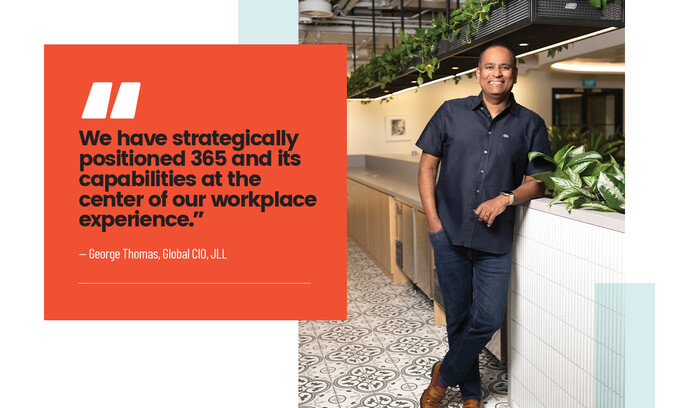
Overall, Microsoft 365 has delivered on three core objectives that Thomas prioritizes for JLL: improved user experience, IT platform health and cost efficiency. “We have strategically positioned 365 and its capabilities at the center of our workplace experience,” he says.

LEARN MORE: Get the help you need to create a sublime work-anywhere experience for your team.

How Google Workspace Boosts Productivity at Atlantic Housing

Atlantic Housing Foundation also sees the value of unified productivity and collaboration suites. The Dallas-based nonprofit, which provides affordable housing in Texas and southeastern states, has relied on Google Workspace since 2013 to support business operations.

“It is absolutely vital,” says Damon Hartman, the organization’s IT manager. “Outside of our financial and resident management tools, this is our core tool, and without it, we couldn’t work. There is no way.”

Atlantic Housing’s 200-plus employees rely on all of the Workspace apps, including Gmail, Google Drive for storage and collaboration, Meet for videoconferences and Chat for messaging. 

When Hartman joined the organization in 2010, collaboration was a major challenge. Multiple employees updating different versions of the same document resulted in lost changes. “We were uploading it and downloading it, so based on who made the changes when, people’s changes would go away,” he recalls.

Click the banner below for deeper insight into IT modernization.


Google Workspace solved this with real-time collaboration, allowing multiple users to simultaneously edit documents. Three years ago, Hartman added Google Voice for Business, giving the hybrid workforce flexibility to make and receive work phone calls on computers or smartphones.

Several years ago, Atlantic Housing upgraded from Google’s free-for-nonprofits version to a paid account for expanded storage. Google’s admin console makes management easy, from provisioning access to maintaining security, Hartman says.

Employees now use the Gemini AI assistant to improve productivity. Accounting teams extract lease information from financial reports while community services staff use it to refine newsletters.

“You can say, ‘pull this data out of this sheet,’ or ‘summarize this meeting document,’” Hartman says. “It’s a huge time savings, especially for rote tasks. I foresee a big benefit in every department.”

DIG DEEPER: Here are a few ways IT leaders are rethinking customer service.

How a Wellness Retreat Powers Guest Services 

When the wellness retreat staff at Sensei need to coordinate guest services across its luxury properties in California, Hawaii and Mexico, they rely on Microsoft Teams for seamless communication and a custom wellness application that tracks guest preferences, health goals and treatment history.

Teams, part of Sensei’s Microsoft 365 implementation, enables instant coordination between wellness guides, practitioners, the front desk and other support staff. While wellness professionals access guest data through secure Apple iPads, all staff members use Teams for operational communication.

“Teams is in constant use,” says Nick DeMarco, Sensei’s vice president of IT. “It’s secure instant messaging, and it works: ‘Can you meet me over here? We’ve got to take care of this.’”

32%

The share of organizations that want to help employees use collaboration and communication tools more effectively

Source: SMB Group “2025 Top 10 SMB Technology Trends,” Jan. 2025

When DeMarco joined Sensei two years ago, he consolidated 15 disparate applications. While not all were replaced by Microsoft 365 tools, his consolidation effort resulted in significant cost savings and productivity gains.

“My first year, we brought down the IT budget by at least six figures, just by consolidating applications — shutting things down and consolidating on 365,” he says.

Microsoft’s integration makes communication more efficient. Staff can read emails in Outlook, and within Outlook, they can message colleagues through Teams chat. “The communication flow is a lot better,” DeMarco says. “We’re not impaired by having to go to different apps.”

Sensei built a SharePoint employee hub that centralizes corporate resources and announcements. The company rotates Copilot licenses among employees, who report significant benefits. Meeting summarization has proved valuable for executives. Staff members also use Copilot for drafting email and other content, with AI serving as a “thought partner,” DeMarco says. “It’s the best investment we’ve ever made.”

Photography by Boban James
Close

New Workspace Modernization Research from CDW

See how IT leaders are tackling workspace modernization opportunities and challenges.