



Jul 24 2026
Cloud

How Small Organizations Can Ensure Smooth IT Migrations

IT leaders share their best practices for planning and executing successful cloud and software migrations.

When Theodore Dimitrov joined Delta Dental of Arkansas, management gave him clear marching orders: Bring IT operations fully in-house, reduce costs by moving infrastructure to the cloud and modernize at every opportunity.   

He sank his teeth into the challenge by tackling two major migrations. First, he decommissioned a secondary data center by moving workloads to Amazon Web Services (AWS), a plan he inherited. Then, he pursued a more complex project: separating the company’s Microsoft 365 environment from another Delta Dental organization that acted as its managed service provider (MSP).  

Delta Dental had been operating inside that organization’s Microsoft 365 tenant, in a shared services model. But it had outgrown the arrangement and was ready to stand up its own independent environment, giving its six-person IT team full control over how the technology was configured and managed.

Click the banner below to get small business insights delivered to your inbox weekly.


Dimitrov used the transition to modernize. He adopted cloud-only email management, eliminating the infrastructure overhead of on-premises mail servers entirely. He also replaced company-issued phones with a bring-your-own-device model, using Microsoft Intune for mobile application management to protect corporate data at the application layer without owning or managing the hardware.

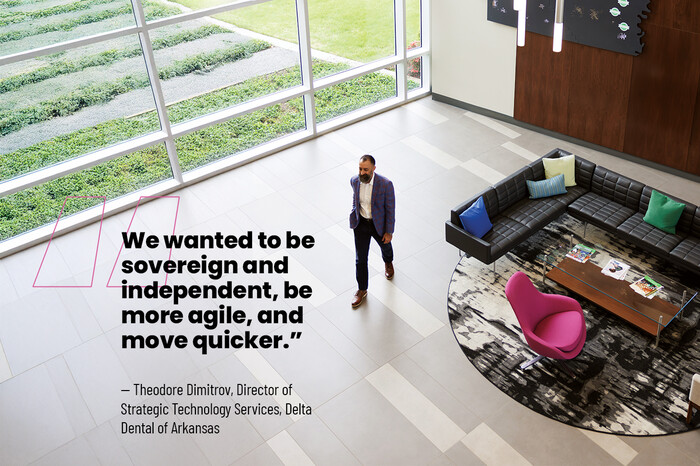
“We wanted to be sovereign and independent, be more agile and move quicker,” says Dimitrov, who is Delta Dental’s director of strategic technology services. 

WATCH NOW: Unlock your data potential with a solid foundation.

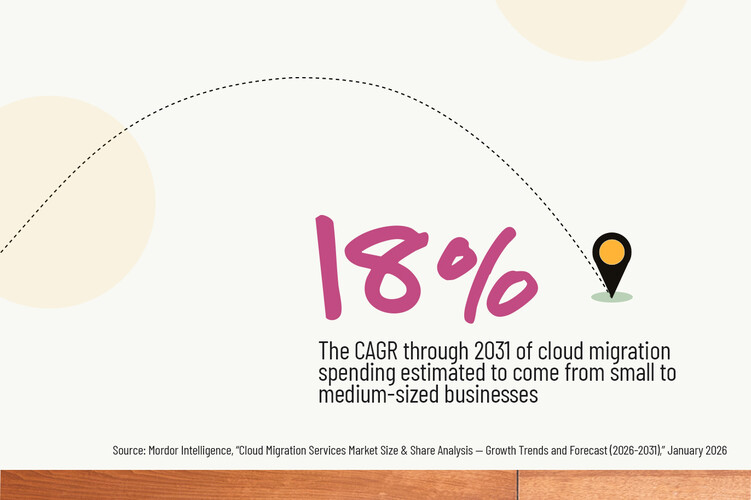
Many Small Businesses Need To Migrate Data

The Sherwood, Ark.-based insurance company isn’t the only small business that’s strived to be nimble with its data. F.C. Tucker Company, an Indianapolis-based real estate brokerage firm, had similar goals: Eliminate its on-premises data centers and improve application availability. It migrated roughly 45 servers worth of workloads, including its website, MLS listings and financial data, to AWS and Google Cloud Platform

Tucker also moved its customer relationship management system, mortgage software and other applications to Software as a Service platforms, says Nadeem Muhammed, senior vice president of digital marketing and technologies: “Everything is in the cloud at this point.” 

Organizations pursue migrations for several reasons, says IDC analyst Ashish Nadkarni: to modernize aging platforms, keep pace with business demands and reduce costs, among others. Trading large upfront hardware investments for the cloud’s operational expenditure model can yield savings.  

“They want to make sure their IT environment is current and is able to serve the needs of the business,” Nadkarni says. “And at the end of the day, it’s all financially motivated. In most IT shops, CIOs are driven by questions like, ‘Am I serving the business, and am I doing it within budget guidelines?’" 
 

Six Best Practices When Migrating Data

Both Dimitrov and Muhammed learned lessons from their migrations. Here are best practices for organizations considering a move, whether it’s to a new productivity suite or cloud infrastructure.

1. Take a phased approach and have contingency plans for each phase

Dimitrov migrated the Microsoft 365 tenant in multiple steps. First, Dmitrov's team, with outside help, deployed a migration tool, established permissions and verified data could flow from the source tenant to the target. As users continued working in the old tenant, the tool synced their email and data to the new one in the background, so that by cutover day, the data was already in place.

Next, it tested the migration with a small pilot group to make sure employees could access their email, launch Teams and find their files. After confirming everything worked, the cutover was scheduled and completed. In a second phase, Dimitrov and CDW separated Delta Dental of Arkansas’s Active Directory from the MSP, giving the organization full control over its identity management.  

“If you have a small IT department but a large organization, don’t do a ‘big bang,’” Dimitrov says. “Chunk it into phases, so you can meaningfully support the staff in case they run into issues.”

IDC’s Nadkarni notes that the most underrated aspect of any migration is process and project management, including having multiple fallback options. “You have to have a Plan B, Plan C, Plan D,” he says. “Sometimes you need many contingency plans, and each one has to have its own workflow.”  

UP NEXT: How can businesses optimize their networks for modern work today?

2. Map application dependencies before migrating from on-premises servers to the cloud

A single application can span multiple servers: a front end, middleware and back-end database. If those components are migrated separately, the front end may have to traverse a VPN to reach the database, introducing latency and degrading performance, Dimitrov says.

Muhammed says the consequences can be worse. If dependencies are broken entirely, the application can stop functioning correctly. 

“You need to have a detailed inventory of everything that application is dependent on before you move it over,” he says. “Because once you move it over and those dependencies are missing, you’re going to run into issues.”  

Cloud tools can help. For example, organizations can use tools like Azure Migrate to map server-to-server network connections, Dimitrov says. Those without such tooling will have to lean on the IT staff’s institutional knowledge or monitor network traffic to see which servers are talking to each other, he says.  

3. Optimize your workloads for the cloud before or after the migration

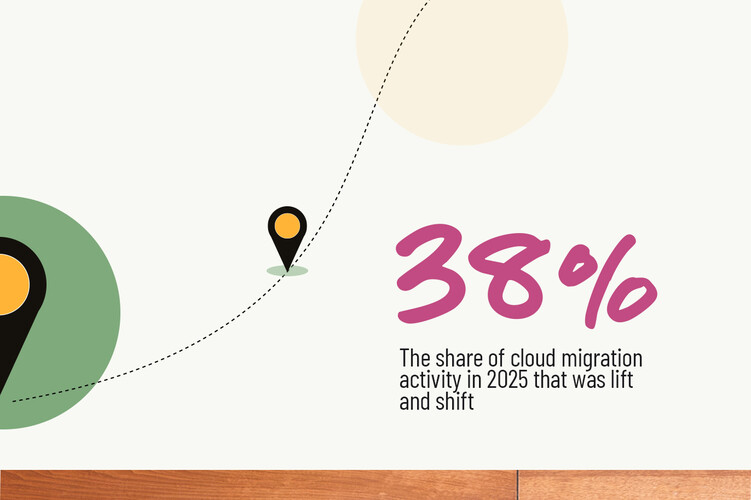
Lift and shift can get applications and data onto a new platform quickly. But applications that were underperforming previously won’t automatically improve just because they moved — and if you move them from on-premises to cloud, it will cost more to operate. Muhammed learned that the hard way in a previous role when he migrated a poorly performing app to the cloud. He hoped it would fix the problem, but it just got more expensive.

“If you have a poor application in the data center, it’s going to behave poorly in the cloud. The only difference is that now, you are pouring money into that application,” he says.

Theodore Dmitrov, Delta Dental of Arkansas


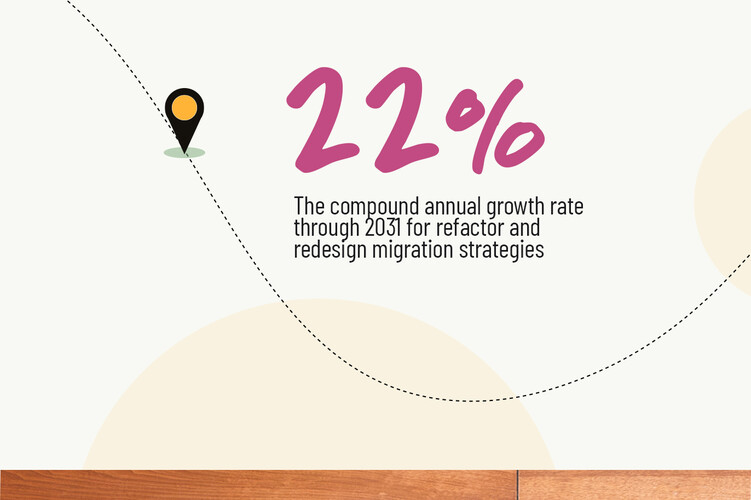
Muhammed took a different approach at F.C. Tucker. Instead of lifting and shifting its website, for example, his team rewrote it. “To move to the cloud, you have to modernize your application for the cloud environment,” he says. “If you’re not doing that, you’re not doing justice to yourself.”

Yet there are times when lift and shift is the right first move. Dmitrov used it to exit the colocation data center quickly, but he always planned to optimize his workloads post-migration. He rightsized overprovisioned instances and moved some workloads from servers to AWS Platform as a Service offerings that improved availability and reduced patching requirements.

Separately, he has begun modernizing some custom, in-house applications by using Microsoft Power Platform to replace custom code and simplify them, so they don’t require full-time developers to maintain.

4. Bring in experts with migration experience or train your staff

Delta Dental of Arkansas’s IT department didn’t have the expertise to migrate its Microsoft 365 tenant, so Dimitrov turned to CDW, which brought in half a dozen engineers with expertise across Exchange, Teams, SharePoint, OneDrive and Entra.

They deployed a migration tool, configured permissions and made sure they could see the source and target tenants. They also planned the cutover and advised Dimitrov on what the user experience would look like during the transition.

"Even if my team was double the size and they were all experts in everything, none of us have had migration-specific experience to know all the gotchas and the tips and tricks," Dimitrov says. “Only people who have done this multiple times will have that information from the trenches. That’s where CDW’s expertise was invaluable.”  

While CDW orchestrated the migration, Dimitrov’s staff rode “in the passenger seat,” learning by observing and asking questions, he says. CDW also provided post-cutover support through a dedicated Teams channel for issues that needed to be addressed quickly.

DISCOVER: Follow these AI data governance strategies for success.

5. Stand up a command center and communicate with users on cutover day

On migration day at Delta Dental of Arkansas, Dimitrov set up a two-tier support system. Senior IT staff and CDW engineers with privileged access collaborated in a virtual command center on Teams, where they could focus on larger, more complex issues. Meanwhile, the help desk staffed a physical command center in a large conference room, where employees could walk in for hands-on support.

“After we saw that hardly anything major needed to be tweaked, we joined the help desk staff to provide additional support,” Dimitrov says.

"It was as seamless as it could have been," Dimitrov says. “By and large, people were up and running by the afternoon, if not earlier.”

6. Don’t forget about security

Many businesses assume their cloud provider will take care of security; it won’t. Cloud service providers deliver a secure infrastructure, but firewall rules, subnet configurations, port restrictions and virtual network design are your responsibility.

The concepts are the same as with on-premises security: Organizations deploy and manage firewalls and impose network segmentation and least privilege access rules, Muhammed says. But in the cloud, they’re implemented with software-defined firewalls and networks instead of hardware.

“You completely own security for your own environment,” Muhammed says. “They will give you the machines. They will make everything available to you. But you are responsible for securing your assets."

Photography by Sara Reeves
Close

New Research from CDW on Workplace Friction

Learn how IT leaders are working to build a frictionless enterprise.