
Jun 12 2026
Digital Workspace

Review: Jabra PanaCast 40 VBS Brings Scalable Hybrid Collaboration to Small Rooms

Android-powered, 180-degree video bar offers intelligent framing and enterprise-grade manageability for modern meeting spaces.

Enterprises modernizing collaboration spaces face a constant problem: Small meeting rooms are often the weakest link in hybrid communication. While large boardrooms receive full audiovisual buildouts, huddle rooms are left with mismatched webcams, USB speakers and inconsistent setups. The Jabra PanaCast 40 VBS is designed specifically to address that gap at scale.

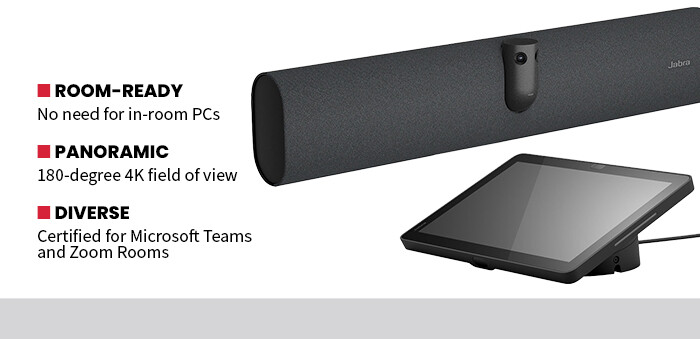
In my testing, the PanaCast 40 VBS immediately stood out for its 180-degree panoramic field of view. Dual cameras stitched together a wide, distortion-free image that captured everyone seated in a small room without forcing participants to crowd into the frame. Unlike camera systems with narrower focus windows that require repositioning or awkward seating adjustments, the PanaCast handled natural meeting dynamics easily regardless of the size of the room or how it was configured.

Click the banner below for expert insights on optimizing your collaboration environment.


Once the video quality was set to full 4K resolution for my tests, neither the quality of the feed nor the frame rate ever dropped. And the motion remained smooth even during screen sharing and speaker transitions. Even speakers who liked to move around the room while talking remained in focus during their presentations.

Intelligent video features, including automatic framing and Jabra’s Virtual Director technology, dynamically adjusted the composition and focus as different participants spoke. The result felt more like a moderated broadcast than a static webcam feed, greatly improving engagement for remote attendees.

PanaCast 40 Delivers High-Quality Audio

For presentations or important meetings, the audio quality is as important as video. That was not a problem for the PanaCast 40 VBS, as the six-microphone beamforming array captured voices clearly from multiple seating positions without requiring participants to lean toward the device. Background noise suppression worked well in simulated open-office conditions, and full duplex audio technology prevented clipping during cross talk. All remote participants during my testing reported continuous clarity.

One of Jabra’s strongest enterprise advantages is its Android-powered appliance architecture. Because the PanaCast 40 VBS runs Android 13 and does not require a dedicated in-room PC, IT teams can reduce complexity while minimizing their potential attack surface. Eliminating separate compute devices also lowers patching requirements and reduces the number of failure points. For organizations standardizing dozens or even hundreds of meeting rooms, that kind of simple but effective architecture can make a significant difference beyond the equipment’s initial price tag.

DISCOVER: The top 3 ways to master operational management in multicloud environments.

Certification for Microsoft Teams and Zoom Rooms also simplifies deployment. In testing, setup within a Teams environment was straightforward, with minimal configuration required beyond account provisioning. The optional 10.1-inch touch-screen controller provides scheduling, room controls and meeting management, aligning well with enterprise room governance models.

The ROI is clear compared with multicomponent room systems. Instead of pairing separate cameras, mics and mini-PCs, the PanaCast 40 VBS consolidates functionality into a single device. That simplified setup will also reduce downtime and the number of support calls.

Enterprises focused on workplace modernization need solutions that scale consistently while preserving security and manageability. The Jabra PanaCast 40 VBS delivers strong video performance, intelligent automation and appliance-level simplicity in a package tailored to high-density collaboration environments.

 

BT_CORP_Q226_PS-Breeden_Jabra_secondary.jpg


Appliance-Based vs. PC-Based Room Systems

Many enterprise collaboration rooms still rely on PC-based systems that require constant patching, anti-virus management and hardware maintenance. And the sad part is that those PCs need to be supported just like the ones out on people’s desks, yet serve no other function beyond occasionally supporting meetings.

Appliance-based models such as the PanaCast 40 VBS shift that burden. Because the unit runs on Android and integrates directly with Teams or Zoom Rooms, it reduces reliance on external compute devices. That means fewer OS updates to manage and a smaller attack surface. Firmware and platform updates can be standardized across locations too, improving governance and compliance.

SPECIFICATIONS

Device Type: Android-powered video bar
Maximum Video Resolution: Up to 4K UHD, panoramic
Microphones: Six mics in an adaptive, beamforming array
Audio: Integrated speaker with full duplex audio
OS: Android 13
Connectivity: HDMI, USB-C, Ethernet, Bluetooth

At its core, the Android 13 OS is basically the same one running on many smartphones. It can be kept automatically updated to the latest security patches with far less effort than wrestling with a PC and the large attack surface that entails. For example, during my test period, there was one update. It installed quickly and cleanly almost without anyone noticing.

For enterprises managing multiple offices, choosing an appliance model can lower lifecycle costs and simplify IT oversight while still delivering a modern collaboration experience. And that appliance will be there ready to support meetings just like a PC would, just without all of the tremendous oversight needed to keep it running well and performing safely over the long term.

Close

New Research from CDW on Workplace Friction

Learn how IT leaders are working to build a frictionless enterprise.